


You might be sitting in a parked car with both hands locked on the wheel, or staring at your phone at 2 a.m. while your chest feels too tight to breathe normally. In those moments, advice like “just relax” lands badly because your nervous system isn't looking for philosophy, it's looking for a fast exit from the spiral. A self help anxiety management app is useful only if it understands that difference.
The right app is built for the seconds when your mind goes blank and the hours when you're trying to teach your body that safety is possible again. That's why the strongest designs work like a two-path system, one path for the storm, one path for the seasons. They don't ask you to be calm first, they meet you where you are, then help you build steadier ground over time.
Table of Contents
- When Panic Hits and Your Mind Goes Blank
- What a Self Help Anxiety Management App Actually Is
- The Core Techniques Inside Today's Anxiety Apps
- How to Evaluate Any Anxiety App Before You Download It
- Using an App for Acute Panic and Long-Term Resilience
- What Self-Help Can and Cannot Replace
- How The Anxiety Checklist Meets These Needs
When Panic Hits and Your Mind Goes Blank
Your phone is already in your hand, but your thoughts are not. Your heart is pounding so hard it feels louder than traffic, and you keep checking your body for signs that something is wrong, which only makes the fear sharper. In that state, a generic wellness app fails because panic does not leave room for menus, browsing, or decision-making.
A good app treats that moment as an emergency entry point. Panic can feed on fear of panic itself, a loop often described as phobophobia and panic attack cycle, where one wave of anxiety quickly becomes fear about the next wave. phobophobia and panic attack cycle The help has to be immediate, simple, and already sitting on the device you carry every day.
Practical rule: if you have to search, log in, or read a long explanation before getting relief, the app is too slow for panic.
That is why the most useful self help anxiety management app designs put relief one tap away and make the first action very easy to start. A technically sound anxiety app should be reachable from any screen with a one-tap panic button, and a technical guide in the research brief recommends response from press to intervention start in under 100 ms, with haptic confirmation and no-login access to reduce friction during distress (systematic review and technical guidance). The point is simple, lower interaction cost during sympathetic arousal makes it more likely you'll begin the coping workflow before panic grows.
The shift here is mental as well as technical. You are not looking for an app that makes you “better at anxiety” in some abstract sense, you are looking for something that can catch you in the middle of a surge and keep you moving long enough for the wave to pass.
What a Self Help Anxiety Management App Actually Is
A self help anxiety management app is a digital tool that turns coping skills into something you can carry, open quickly, and use again and again. The useful ones are built for two different jobs at once. One job is to help during a surge of anxiety. The other is to support slower skill-building so your response to anxiety changes over time.
A phone app can only help if it respects how anxiety behaves. During a panic wave, the mind often narrows to one question, how do I get through this minute. Between episodes, the work shifts toward noticing patterns, practicing new responses, and learning what tends to set off the spiral. A good app is built with both of those states in mind.
Two paths, one app
The clearest way to understand these apps is as a low-friction SOS path and a deeper therapeutic path. The SOS path is the part you open when your chest tightens, your thoughts speed up, or you feel yourself sliding into a panic loop. The deeper path is the part you use when you are calm enough to reflect, log patterns, and practice new habits that make the next anxious episode easier to handle.
That split shows up in common app features. Research on anxiety apps describes tools such as screening, self-monitoring, graphs and charts, reminders and notifications, and CBT delivery tools like chatbots, audio and video content, and Q&A interfaces. A serious app uses those features to do two things at once. It gives you a way to respond in the moment, and it gives you a record of what keeps happening so you can see patterns you might miss on your own.
What it's actually doing
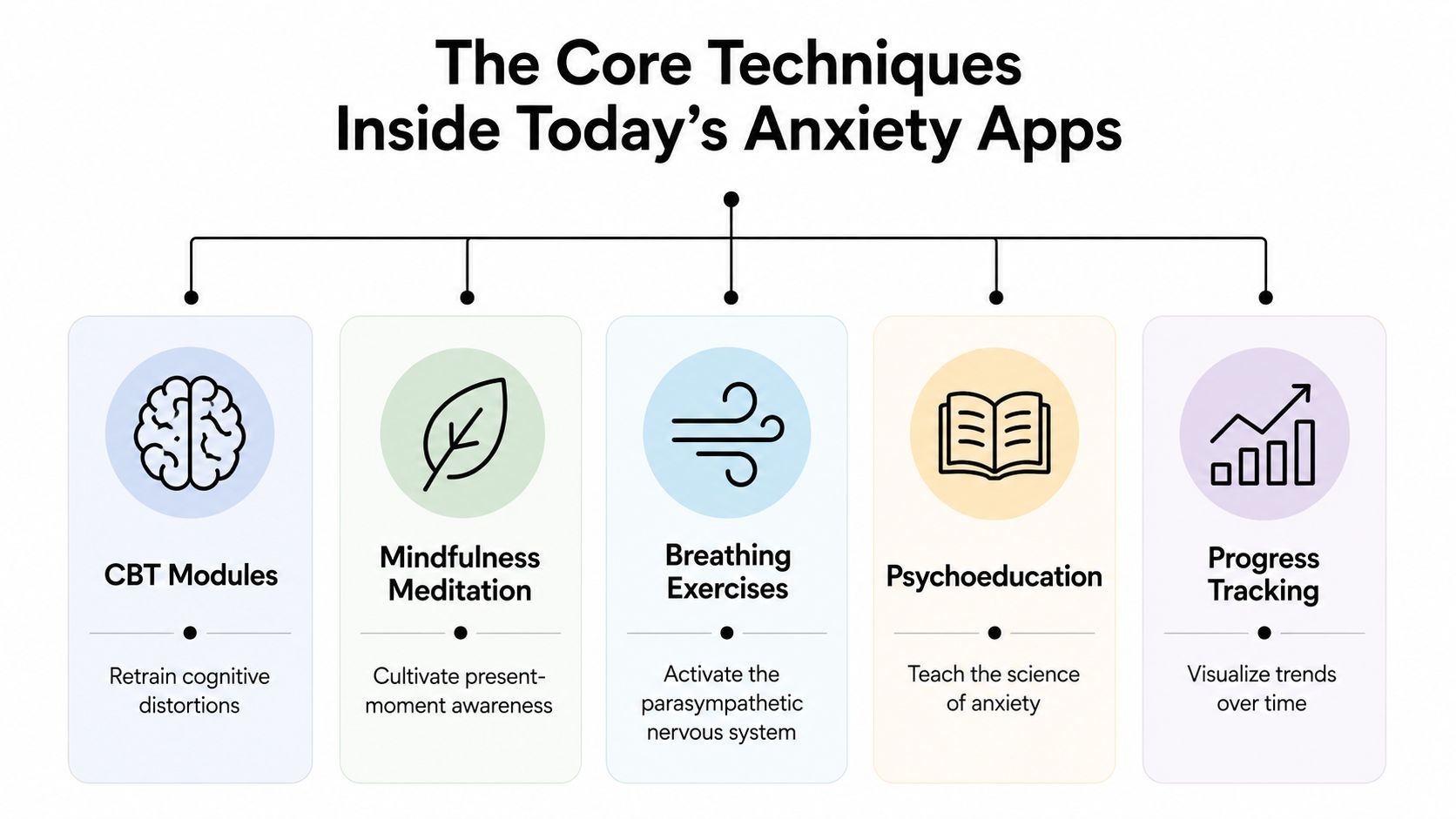
The techniques inside these apps usually include CBT, grounding, breathing, psychoeducation, mindfulness, sleep support, and sometimes hypnosis-style audio. Research on digital mental-health apps for anxiety and panic found recurring features such as a journal or check-in function that records moods, thoughts, emotions, and situations, along with short guides for symptom moments and audiovisual tools such as guided meditation and sleep support. That mix matters because anxiety is not only a thought problem. It also shows up in the body, in behavior, and in the habits that keep repeating.
A useful app does not try to replace therapy with calming visuals and vague reassurance. It translates practical skills into a form you can use on a bad day, when reading a long article or sorting through menus would be too much. If you want a plain-language companion to the thinking side of that process, the article on anxiety self-help guides is a useful place to start.
In plain terms: symptom relief gets you through the moment, skill building changes what happens the next time the moment shows up.
The Core Techniques Inside Today's Anxiety Apps
A useful app usually works on two tracks at once. One track is for the storm, the few minutes when your body feels flooded and your mind goes blank. The other track is for the seasons, the slower work of changing the habits that keep anxiety returning. Good apps make room for both, because a person in panic needs a different tool than a person trying to reduce repeat spirals over time.
CBT and journaling
CBT-style tools often sit at the center of the long-term track. They help you catch the thought loop, write it down, test it, and compare it with what happened. That process matters for people dealing with repetitive worry, especially in patterns covered by overthinking anxiety explained. The goal is not to force positive thinking. It is to make the thought more accurate and less sticky.
A strong journaling flow gives the app something useful to work with. If you record the trigger, the intensity, the coping step, and the result, the app can spot patterns instead of treating every episode as random. If your logs keep pointing to late-night spikes, it can suggest sleep support. If social settings keep showing up, it can suggest gradual exposure practice instead of sending the same generic tip.
Breathing, grounding, and calm cues
Breathing exercises work because they slow the body's alarm response. Grounding works because it pulls attention out of future fear and back into the room you are in. A short breathing cue, a five-senses prompt, or a guided grounding track may look basic on the screen, but panic usually responds better to basic steps than to complicated ones.
A person who has frozen in a meeting or on a bus already knows how important that simplicity can be. The body cannot stay in full emergency mode forever, and a timely cue can help it begin settling. A practical guide to grounding techniques can make it easier to see why these short exercises are included in so many apps.
Hypnosis, sleep, and long-view support
Some tools are built less for the peak of anxiety and more for what happens before and after it. Sleep audio, guided meditation, and hypnosis-style tracks are usually meant to help the body practice calm until it feels less foreign. That kind of repetition can matter if your system only knows how to brace itself.
The review in the brief also describes journaling as useful for managing anxiety and stress, and it notes that sleep-hygiene features may include diaries, wearable syncing, and reminders. That matters because evening anxiety often needs a slower kind of support than a quick breathing prompt can give. It also fits the broader picture of regulating your nervous system in high-stakes roles, especially if pressure tends to build around performance, responsibility, or constant alertness.
How to Evaluate Any Anxiety App Before You Download It
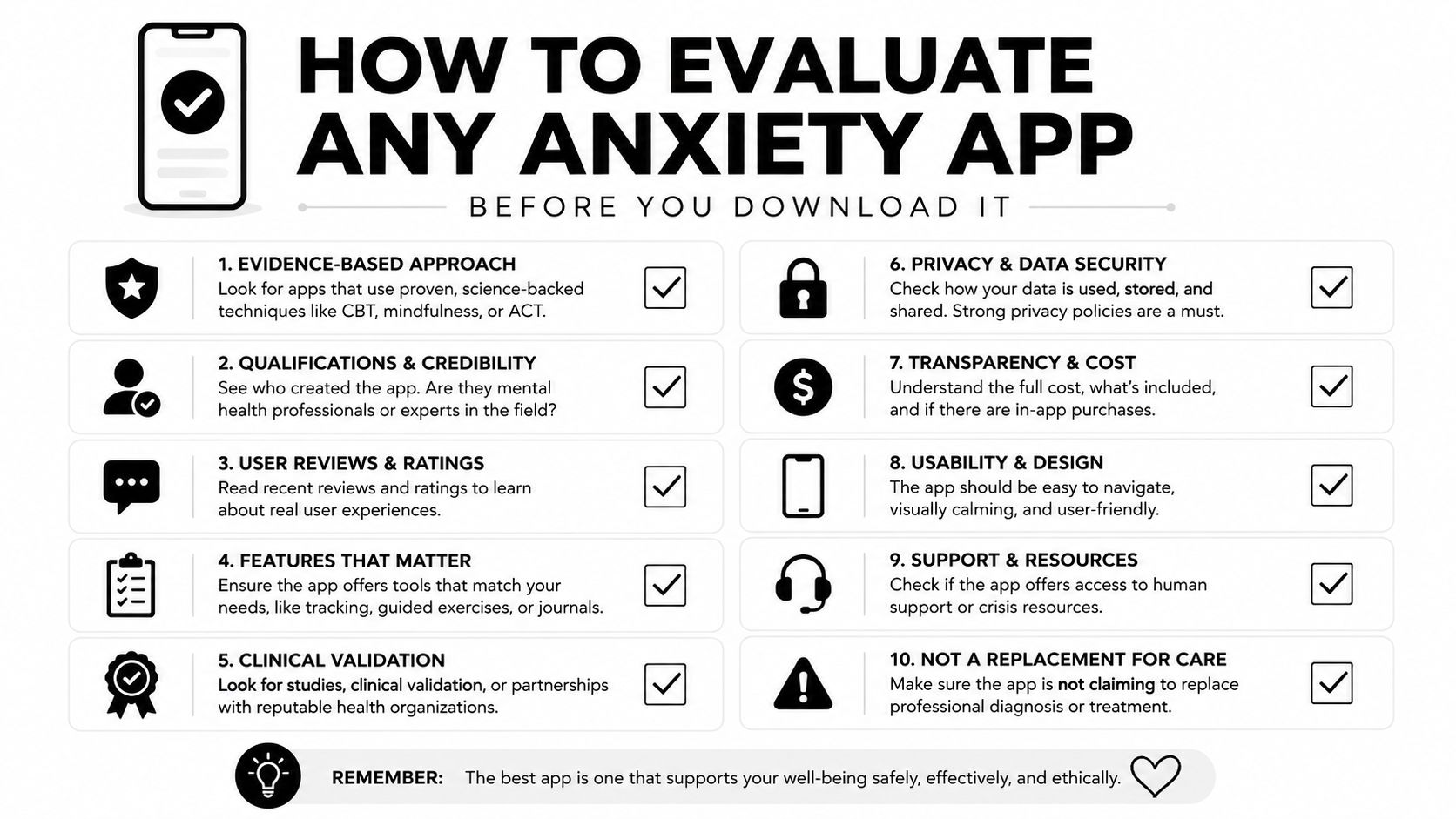
A polished app store page can hide a weak product. The core test is simple. Can the app still help when your mind is foggy, your body is on alert, or you only have enough focus for a few taps? Good anxiety apps respect both your nervous system and your attention, which means they should feel easy to reach and clear to use under stress.
Seven things that matter
- SOS mode: Immediate grounding tools for panic should be easy to find from any screen and should take only a few taps.
- Evidence-based content: CBT-style tools are a stronger sign than affirmations with no method behind them.
- Privacy policy: Clear data handling matters, especially if the app stores your logs, moods, or triggers.
- Personalization: The app should adapt to your patterns instead of giving everyone the same content.
- Offline access: Core features should work without internet, because panic does not wait for a signal.
- No forced log-in: Distress should not meet a friction wall.
- Professional backing: Content should come from real mental health expertise, not just app-store branding.
A quick way to judge the app is to ask whether it has two paths, one for the storm and one for the quieter seasons. The storm path is the part you use during panic, so you want fast access, short prompts, and tools that do not ask much from a flooded brain. The quieter-season path is the part that helps you practice skills, notice patterns, and build steadier habits over time. If an app only offers one of those, it may look useful without being useful in real life.
Watch for this: if an app sounds soothing but cannot explain how it helps, you are probably looking at a mood product, not a real support tool.
A careful app-store scan should also show whether the app is built for repeated use, not just first impressions. If the only visible path is meditation, and there is no journaling, no structured CBT, no offline support, and no clear privacy language, keep moving. A strong app gives you something to use in the middle of a panic wave and something to return to when life is calm enough for practice.
Using an App for Acute Panic and Long-Term Resilience
A good app has to do two different jobs, sometimes in the same day. One job is for the storm, the moment panic is already moving through your body. The other is for the quieter seasons, when you practice skills that make the next wave feel less overwhelming.
A panic wave usually leaves little room for complicated choices. You need something you can open fast, follow without much thinking, and use even when your mind feels loud and scattered. A calm week asks for something else. That is when the app should help you notice triggers, practice coping skills, and build steadier responses over time.
During a panic wave
A grocery store can turn into a hard place in seconds. Your pulse jumps, your breathing changes, and the thoughts that normally help you reason through discomfort go thin. Opening an SOS mode, tapping a grounding prompt, listening to a short breathing track, and reading a brief reminder that the feeling will pass can give your mind something simple to hold onto.
That kind of tool earns its place by lowering the effort needed to start. Panic narrows attention, so even small steps can feel hard to begin. A fast path matters because the more work the app asks for, the less likely you are to use it in the middle of a wave.
Short prompts help because they match the state you are in. A flooded brain does better with one clear instruction than with a long menu of options. If the app also offers a guide to grounding techniques, that gives you a way to settle your attention without having to invent the next step on your own.
Over a normal week
The longer path looks calmer, but it does more of the training. You log a trigger after a rough call, write down the thought that followed, check whether that thought held up, then use a calm-down exercise before sleep. The next day, you might choose a brief exposure practice or a walk instead of waiting for the next spike to force the issue.
Progress with anxiety usually comes from repetition, not force. Small practices repeated often teach your body that calm is not foreign, just less familiar than alarm. That is why journaling, structured CBT exercises, and light habits can matter even when nothing feels urgent.
For people who want a broader behavioral anchor, the app can sit alongside short walks, sleep routines, and regular reflection. The point is not to pile on more self-improvement. It is to create a steady loop that helps your mind and body recognize safety often enough that it starts to feel more normal.
What Self-Help Can and Cannot Replace
A self-help app can help in a real moment, but it is not therapy. That line matters because apps can look more complete than they are, and people sometimes delay care while hoping a phone tool will do everything. A phone can lead you through a coping exercise. It cannot diagnose you, hold your full history in mind, or respond like a clinician during a crisis.
The research picture also has limits. The anxiety app review showed that many anxiety apps still lack professional involvement and careful testing, even though smartphone apps can reduce anxiety symptoms with modest effects and stronger engagement features often go with better outcomes. That is the practical lesson behind the marketing. An app can support change, but it is not a substitute for treatment.
If anxiety is getting in the way of work, relationships, sleep, or daily function, professional support should be part of the plan. If panic keeps spreading, avoidance keeps growing, or your life starts to feel smaller around the edges, a clinician can help you sort out whether psychotherapy, medication evaluation, or crisis services makes more sense than self-help alone. If you are also comparing supplement claims while trying to manage symptoms, the page to find the right anxiety aid can help you think more carefully about what belongs in your plan and what does not.
A useful way to judge any app is to ask two questions. Can it help during the storm, when your mind blanks out? Can it also support the quieter seasons, when you are trying to build steadier habits and fewer spirals? A strong self-help tool should do both in some form, because panic care and long-term resilience ask for different kinds of support.
The clearest rule is simple. Use an app for support, structure, and practice. Reach for professional care when you need assessment, accountability, or real-time help that a phone cannot provide.
How The Anxiety Checklist Meets These Needs
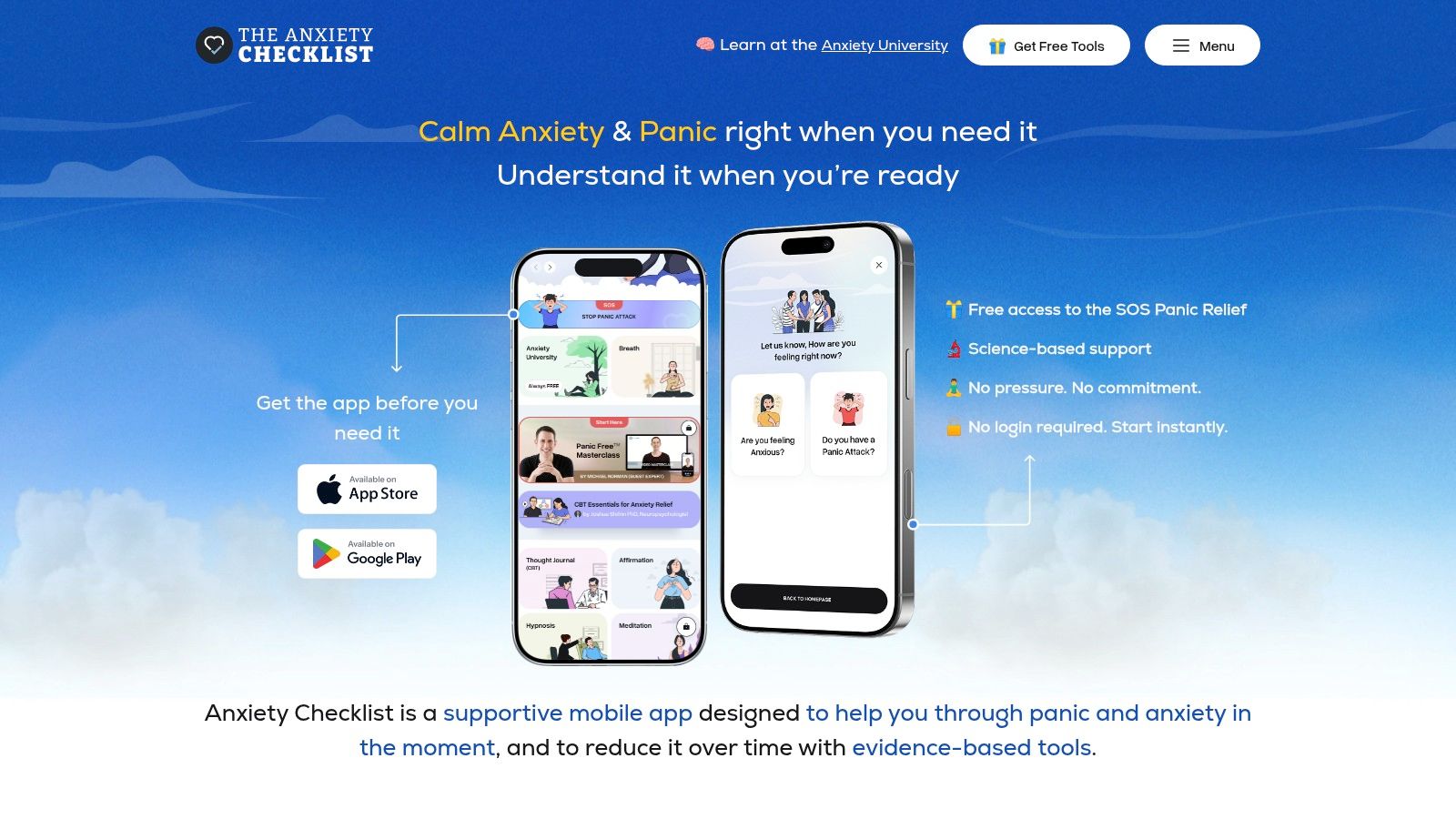
The Anxiety Checklist app fits the two-path model in a way that's easy to understand. Its always-free SOS mode gives you grounding prompts, affirmations, and quick relief tools when your mind blanks out, and you don't need to create an account before getting started. That matters because distress doesn't reward extra steps.
The deeper path inside the app
The longer-term side includes CBT self-therapy tools, such as thought journaling, belief experiments, and exposure therapy. It also includes hypnosis, sleep audios, guided meditations, and walking sessions for people who want nervous-system retraining beyond a single breathing exercise. The educational side includes a CBT introduction by Dr. Joshua Shifrin, PhD, the PanicFree Masterclass by Michael Norman, and more than 65 articles in Anxiety University (Anxiety Checklist app).
The structure matches what the research says these apps need, a fast relief path plus a data-rich long game. It also gives people room to explore premium content through a 7-day free trial without pressure. That combination makes the app feel built for actual panic, not just for tidy practice sessions on calm days.
If you want a single place to start thinking about panic relief and long-term resilience together, visit The Anxiety Checklist and look at how its SOS tools, CBT modules, and daily support features fit your needs.